
Recently I received an email from Peru. An ADF developer from Peru was facing a challenge with ADF. In short: ‘the upload of a (large) file should be followed by a potentially long running job. Ideally, the browser would not freeze while the uploaded file is processed and on top of that it would be great to report the progress of the job to the user’.
I like this kind of challenge, especially since I consider both asynchronous processing and server push two of my areas of interest. So I took on the challenge and tried a quickly put together an application that demonstrates this behavior.
This article discusses how I used standard Java concurrency functionality to take the job off line (in a scheduled, background job) and how I leveraged Active Data Service in ADF Faces to have the background job report its progress through an active bean and server push to the browser.
After the user kicks off the job by pushing a button:

the user will be in control again (synchronous but background parrtial request completes) and and will also be informed on the job’s progress through the server push:
In this example, the job progress in steps of 10% that take between 2 and 4 seconds. As soon as a step is completed, the client is updated and the user thus informed.
The outline of the solution can be described as follows:
when the user pushes a button, an action listener in a (request scope) managed bean is triggered (in a partial page request, although that does not really matter). This beans spawns a second thread that will do the background processing of the job.

The actionListener is implemented like this:
public void runBigJob(ActionEvent ae) {
  // start job in parallel thread
  // (the activeBean is available as the object to inform of the progress of the big job)
  ScheduledExecutorService ses = Executors.newScheduledThreadPool(1);
  ses.schedule
  ( this
   , 3 // let's wait one second before starting the job
   , TimeUnit.SECONDS
    );
  // then complete the synchronous request

}
The managed bean jobCoordinator is injected with a reference to the activeBean. This activeBean implements the BaseActiveDataModel – a class dictated by ADF Active Data Service. Values passed to this bean can be pushed to the client.
The bean configuration from the faces-config.xml file:
<managed-bean>
  <managed-bean-name>activeBean</managed-bean-name>
  <managed-bean-class>nl.amis.hrm.view.ActiveBean</managed-bean-class>
  <managed-bean-scope>session</managed-bean-scope>
</managed-bean>
<managed-bean>
  <managed-bean-name>jobCoordinator</managed-bean-name>
  <managed-bean-class>nl.amis.hrm.view.LongRunningJobCoordinator</managed-bean-class>
  <managed-bean-scope>request</managed-bean-scope>
  <managed-property>
    <property-name>activeBean</property-name>
    <property-class>nl.amis.hrm.view.ActiveBean</property-class>
    <value>#{activeBean}</value>
  </managed-property>
</managed-bean>
The reference to the activeBean is passed from the jobCoordinator to the second thread that is scheduled to process the job in the background. This thread will be able to directly update activeBean (and indirectly push to the client).
Here is the Java code that represents the background job and informs the activeBean:
public void run() {
  activeBean.triggerDataUpdate("Start - 0 %");
  // normally you would do the real work such as processing the big file here
  for (int i=0;i<10;i++) { // sleep between 2 and 4 seconds
          try {
              Thread.sleep(((Double)((2+2* Math.random())*  1000)).longValue());
          } catch (InterruptedException e) {
          }
          activeBean.triggerDataUpdate((i+1)*10+" %");
  }
  activeBean.triggerDataUpdate("Job Done - 100 %");
}
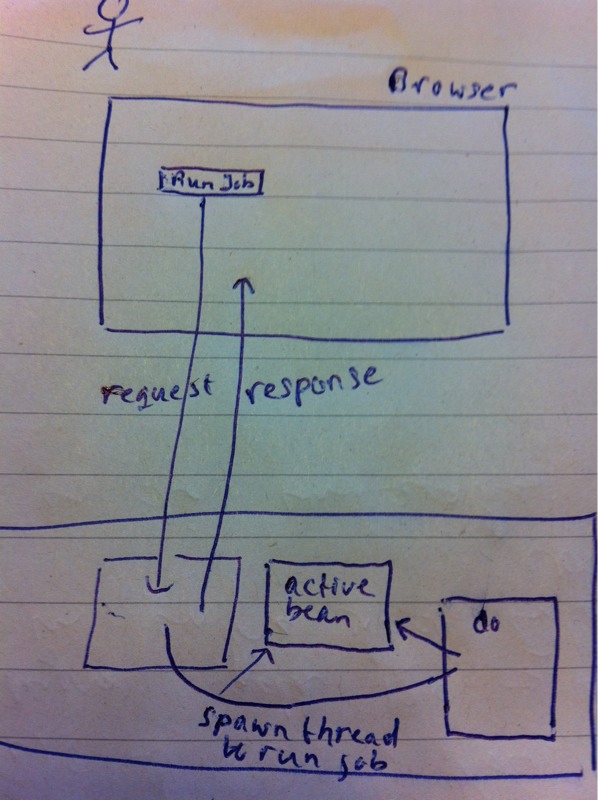
When the thread has been scheduled, the synchronous HTTP request cycle that started with the button push in the browser is now complete. The user can continue to work ; the job is in progress (or soon will be) in a separate thread in the Application Server’s JVM. This thread has its own reference to the activeBean and can inform this bean of the progress it makes on the job.
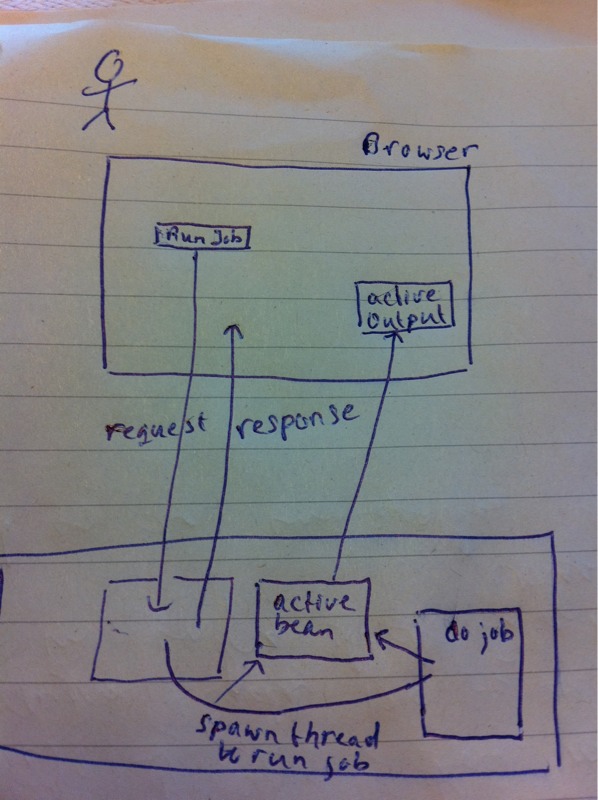
The activeBean is referenced from an activeOutputText component.
<af:activeOutputText id="jobStatus"
                     value="#{activeBean.state}"
                     inlineStyle="color:brown;font-size:18px;font-weight:bold;text-align:center;">
  <af:clientListener type="propertyChange"
                     method="activeDataCallback"/>
</af:activeOutputText>
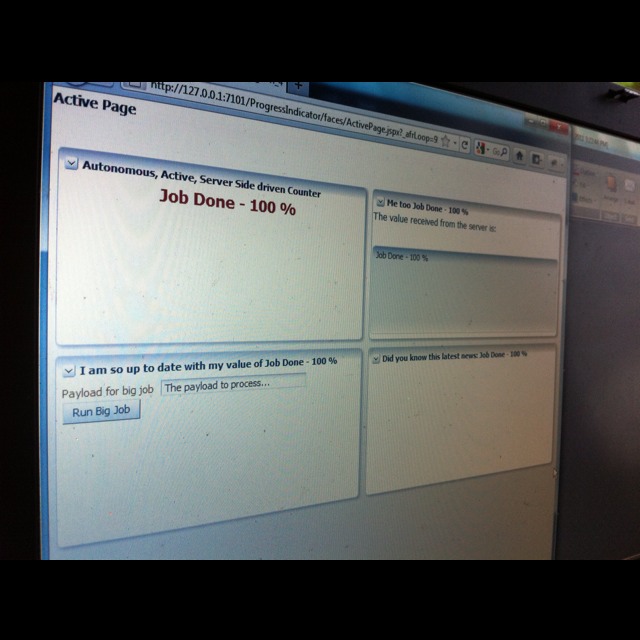
Note: the clientListener is triggered whenever a new value is pushed to the activeOutputText. It invokes a JavaScript function that uses the pushed value to update various client side components. That is why the progress is reported in various locations in the client.
Because the activeBean implements the ActiveDataModel that allows for push, the component can receive push messages from the bean.
public class ActiveBean extends BaseActiveDataMode
    @PostConstruct
    public void setupActiveData() {
        ActiveModelContext context =
            ActiveModelContext.getActiveModelConte
        Object[] keyPath = new String[0];
        context.addActiveModelInfo(this, keyPath,

    }

    public void triggerDataUpdate(String message)
        counter.incrementAndGet();

        ActiveDataUpdateEvent event =
            ActiveDataEventUtil.buildActiveDataUpd
            ( ActiveDataEntry.ChangeType.UPDATE
            , counter.get ()
            , new String[0], null
            , new String[] { "state" }
            , new Object[] { message }
            );

        fireActiveDataUpdate(event);
    }
   .....
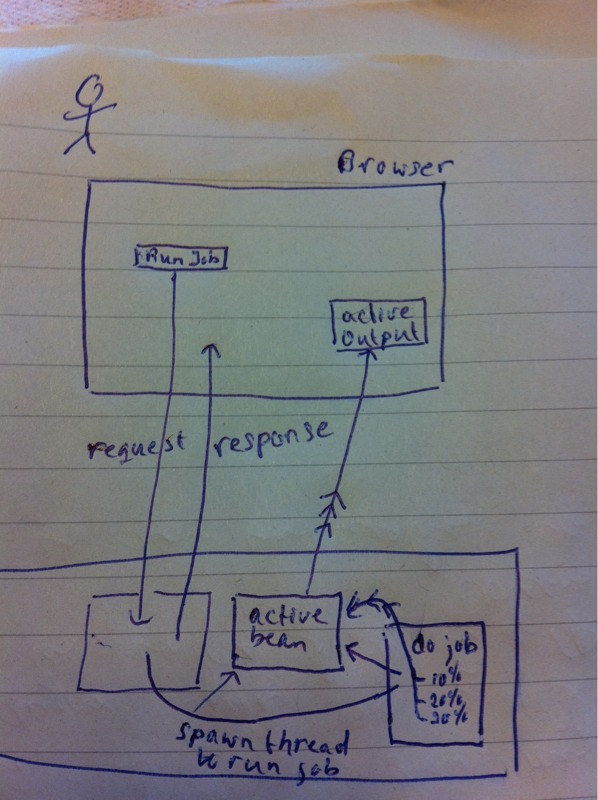
Any update sent from the background thread to the activeBean is passed onwards to the activeOutputText component.
When the job is complete, a final update is sent to the activeBean, just before the background process completes. This final message is also passed to the browser through the Push mechanism.

The page looks as follows after the job has completed. Remember: after pressing the button to start the job, the user did not have to do anything in order to get the status updates pushed to the browser.
Resources
Download JDeveloper 11.1.1.4 application with this server push example: ProgressIndicator.


Another allied question…
Problem#1
I have to upload a XML file (say a SAP purchase order) and populate UI with the details. To achieve this I have coded a file upload mechanism and a JAXB Data control derived out of the XSD (which the uploaded XML bases on) and did a drag drop of the DC on a JSPX page as a master detail form (read only).
Now, I can create a jaxb context, I can marshal the input xml and cast it to the root JAXB object  (lets say OrderRequestDocument).. I can populate the entire hierarchy from the root  (OrderRequestDocument.Order, OrderRequestDocument.BillingAddress) .  At this point, how can I update the view just by populating the root (from a view/pageflow/request scoped managed bean)?  I can always use EL and update the UI elements one by one like          ValueExpression idBinding = exprFactory.createValueExpression(elctx,”#{bindings.orderId.inputValue}”,Object.class);
idBinding.setValue(elctx, getOfferDetailsResponse.getOrder().getOrderId()); Â Â but considering the number of fields this approach doesn’t seem feasible.
Problem#2
I have followed the example code given in this post and it indeed works like a charm. However, something  is amiss when I try to get this to work in conjunction with the file upload+JAXB processing (as the long running job).  I want the  progress counter to start as soon as the valueChangeEvent is fired from the file dialog and to stop when the form is populated (last line of some method)… here the progress monitor panel starts printing an integer i.e the STATE and not the MESSAGE..  i see on the page that the counter increments but the data in the ‘message’ variable doesn’t appear.
Â
It would really help if you share your thought.
Hi Adi,
It should indeed be possible to use the progressIndicator component. Simply manipulate that component via JavaScript, or, if that fails, send a server event and have the backend ppr the progressIndicator.
I think the upload itself – the process of reading data from the local client and posting it over HTTP to the server – is not a process that we can track the progress of. However, as soon as the upload is done, the processing of the file is a candidate for reporting progress.
I may be mistaken in that perhaps a large file, while it is received bit by bit, is already available for processing; I am not sure about that.Using the file upload component from Apache Commons (for example) it is possible to access the stream containing the file content that is being uploaded; this would open the door for reporting progress on receiving the file; note that this may interfere with the ADF way of uploading files – I am not sure about that. See http://www.jedi.be/blog/2009/04/10/java-servlets-and-large-large-file-uploads-enter-apache-fileupload/Lucas
Awesome post Lucas. I was wondering if a file upload status can be monitored with this approach. My requirement is something like – I’ll upload a XML–> populate a ADF form/Table (JAXB data control) .  Also wanted to check if  a af:progressindicator component can be with this push pattern instead of the conventional poll mechanism
Hi Adi,
I have same requirement now. Can you share your thought how u have implemented it?
thanks.
HI Lucus,
I am having one questions regarding ADS Flow.
In your example your having one variable with (
state) what about multiple variables.suppose i want to use ADS with af:table let's consider Employee and department. In Employee as we have department as a contained object so when we drag drop employee as a table . The table will have both employee and department binding as we are dragging employee all attributes from employee are accessible at row first level as #{row.firstname} and for department attribute it will create entry as #{row.employee.binding.departments.fepartmentName} as a entry.My question how we can update such a contained object when ADS. How exactly we can fire event for contained object?Â
Â
Nice share. Â Just curious the adf processIndicator & poll components can do same thing. What’s the benefit for the ActiveDataModel?
Hi Lucus,
Nice showcase! I’ve got a remark/question about the scope of the activeBean, it’s set to session. What happens when the jobs is taking a very long time (lets say an hour) and the user doesn’t wait until its finished and closes the browser. It the ActiveBean going to be GC’ed after session timeout or does it finish it’s job? (lets assume it should finish the job). Or is application scope necessary to achieve this?
Also I’m a bit currious how this works under the hood. Long Ajax request, polling Ajax requests or another technique?