
It has been more than a year since I published my previous blog on generating PDF with pl/sql.
In that time I’ve rewritten as_pdf two times, so now its time for as_pdf3
The most important improvement is Truetype Fonts
declare
x pls_integer;
begin
as_pdf3.init;
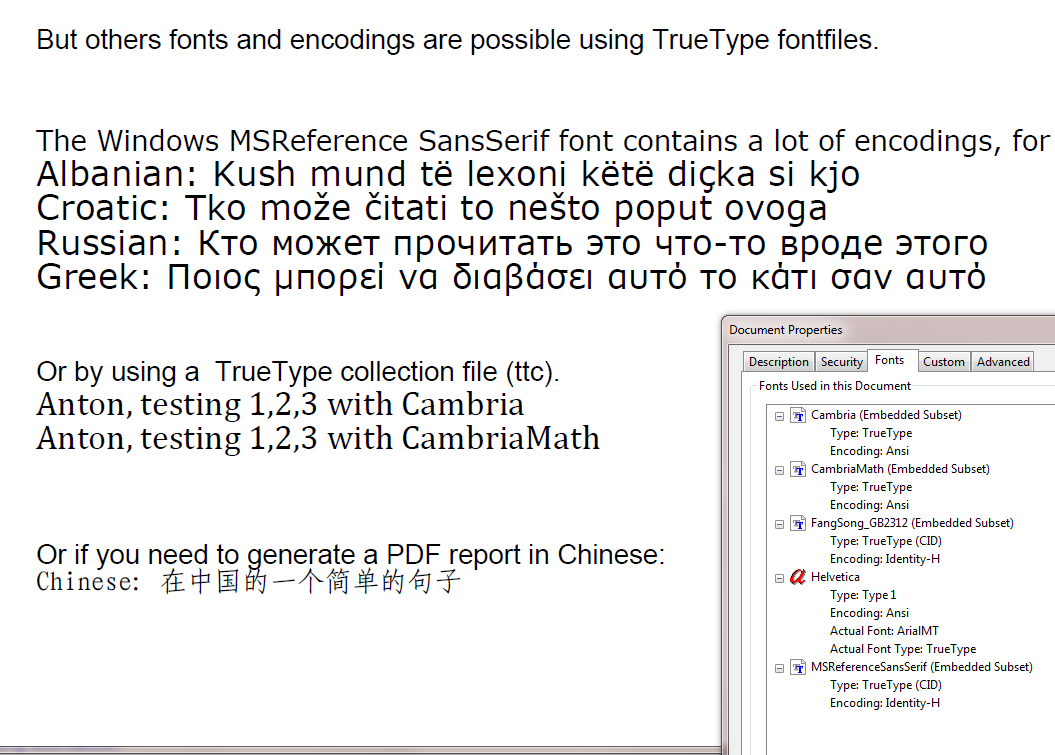
as_pdf3.write( 'But others fonts and encodings are possible using TrueType fontfiles.' );
x := as_pdf3.load_ttf_font( 'MY_FONTS', 'refsan.ttf', 'CID', p_compress => false );
as_pdf3.set_font( x, 12 );
as_pdf3.write( 'The Windows MSReference SansSerif font contains a lot of encodings, for instance', -1, 700 );
as_pdf3.set_font( x, 15 );
as_pdf3.write( 'Albanian: Kush mund të lexoni këtë diçka si kjo', -1, -1 );
as_pdf3.write( 'Croatic: Tko može čitati to nešto poput ovoga', -1, -1 );
as_pdf3.write( 'Russian: Кто может прочитать это что-то вроде этого', -1, -1);
as_pdf3.write( 'Greek: Ποιος μπορεί να διαβάσει αυτό το κάτι σαν αυτό', -1, -1 );
--
as_pdf3.set_font( 'helvetica', 12 );
as_pdf3.write( 'Or by using a TrueType collection file (ttc).', -1, 600 );
as_pdf3.load_ttc_fonts( 'MY_FONTS', 'cambria.ttc', p_embed => true, p_compress => false );
as_pdf3.set_font( 'cambria', 15 ); -- font family
as_pdf3.write( 'Anton, testing 1,2,3 with Cambria', -1, -1 );
as_pdf3.set_font( 'CambriaMath', 15 ); -- fontname
as_pdf3.write( 'Anton, testing 1,2,3 with CambriaMath', -1, -1 );
--
as_pdf3.set_font( 'helvetica', 12 );
as_pdf3.write( 'Or if you need to generate a PDF report in Chinese:', -1, 520 );
as_pdf3.set_font( as_pdf3.load_ttf_font( 'MY_DIR', 'simfang.ttf', 'CID', p_compress => false ), 12 );
as_pdf3.write( 'Chinese: 在中国的一个简单的句子', -1, -1 );
--
as_pdf3.save_pdf;
end;
But some more things, headers en footers:
declare
t_rc sys_refcursor;
t_query varchar2(1000);
begin
as_pdf3.init;
as_pdf3.load_ttf_font( 'MY_FONTS', 'COLONNA.TTF', 'CID' );
as_pdf3.set_page_proc( q'~
begin
as_pdf3.set_font( 'helvetica', 8 );
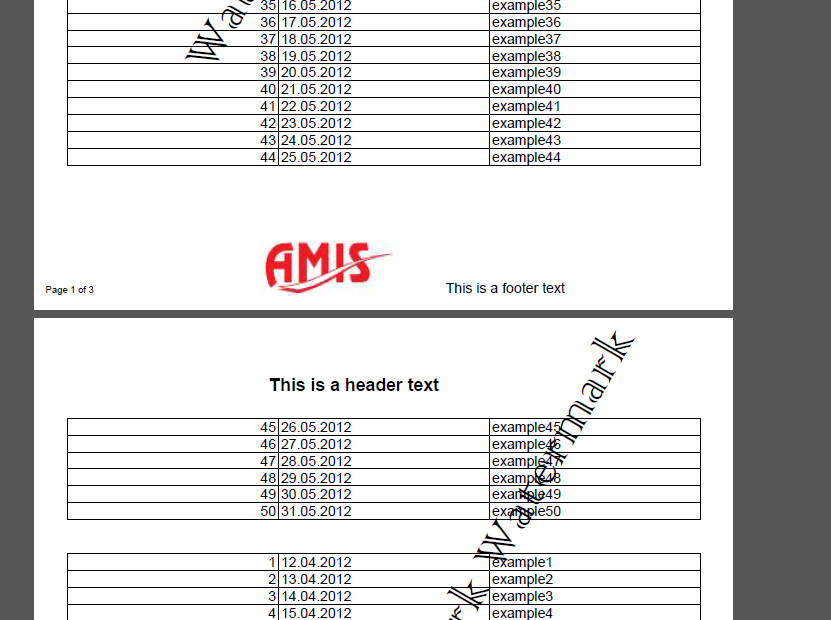
as_pdf3.put_txt( 10, 15, 'Page #PAGE_NR# of "PAGE_COUNT#' );
as_pdf3.set_font( 'helvetica', 12 );
as_pdf3.put_txt( 350, 15, 'This is a footer text' );
as_pdf3.set_font( 'helvetica', 'B', 15 );
as_pdf3.put_txt( 200, 780, 'This is a header text' );
as_pdf3.put_image( 'MY_DIR', 'amis.jpg', 500, 15 );
end;~' );
as_pdf3.set_page_proc( q'~
begin
as_pdf3.set_font( 'Colonna MT', 'N', 50 );
as_pdf3.put_txt( 150, 200, 'Watermark Watermark Watermark', 60 );
end;~' );
t_query := 'select rownum, sysdate + level, ''example'' || level from dual connect by level as_pdf3.query2table( t_query );
open t_rc for t_query;
as_pdf3.refcursor2table( t_rc );
as_pdf3.save_pdf;
end;
And the code for this package: as_pdf3
See also this blog for some additions.
** Changelog:
** Date: 13-08-2012
** added two procedure for Andreas Weiden
** see https://sourceforge.net/projects/pljrxml2pdf/
** Date: 16-04-2012
** changed code for parse_png
** Date: 15-04-2012
** only dbms_lob.freetemporary for temporary blobs
** Date: 11-04-2012
** Initial release of as_pdf3


Hi Anton,
is there a way to add bookmarks to pdf using oracle pl/sql?
Thanks.
@Naga
Not with as_pdf3
Hi ANTON,
Thank you for the useful script,
can I embed SVG using as_pdf3 ?
There’s no support for SVG.
Dear,
Thank you for sharing your code.
Could you add to support right to left direction(e.g Arabic or Persian Languages)?
Regards,
Saeed.
I can’t add support for RTL because I don’t have any RTL-fonts and I can’t understand/read any RTL language
Hi Anton,
I have resolved my resolution issues – it was indeed the image.
I have another question now – I am using this package to create a pdf which then I in a brower using wpg_docload.downloadfile().
I call finish_pdf (changed it to public) to create the temp lob and then I call a procedure I wrote to display to pdf to the browser:
here are the guts:
owa_util.mime_header( nvl(v_mime,’application/octet’), FALSE );
htp.p(‘Content-Length: ‘ || DBMS_LOB.GETLENGTH(g_pdf_doc));
htp.p(‘Content-Transfer-Encoding: binary’);
–File that will be used by the broswer is the users does a “Save as”
htp.p(‘Content-Disposition: inline; filename=’ || p_filename );
owa_util.http_header_close;
WPG_DOCLOAD.DOWNLOAD_FILE(g_pdf_doc);
After calling wpg_docload.downloadfile, I check V$TEMPORARY_LOBS and I see that the cache_lobs column is increasing in number – that is, the session is generating this temp lob is not being released.
I only have this issue when I call wpg_docload.downloadfile(). If I don’t call this then the temp lob (s) are being released and cache_lobs = 0.
I have tried calling dbms_lob.freetemporary(g_pdf_doc) after downloading the file but it doesn’t change anything.
Is is possible that wpg_docload.downloadfile is creating the temp lob and not freeing it??
Any suggestions?
Thanks,
Michelle
Anton
Many thanks for a wonderful piece of code. I am attempting to design some code which creates a PDF document from data in our database (this is no problem) and also outputs a PNG image embedded in a BLOB in a database table. The PNG image happens to be a captured signature.
When I output it, the PNG image is output 3 times side-by-side, each copy being a part of the image with white lines interlaced.
When I use a simple PNG image, it displays fine. The problem only occurs when using a PNG image captured by the signature software.
I compared a working PNG image with a non-working PNG image and the first different I found was in IHDR image header in the PNG file. The color type in a working PNG image is 02 (an RGB triple) and the non-working one is 06 (RGB followed by alpha sample).
From my research of this, it seems to indicate that this means it is a PNG with transparency, which is only supported in later versions of the PDF specification.
I see that yours is based on the PDF-1.3 specification and that the parse_png function only really seems to cater for color types 00-04, and has a simple “else” for others.
My question is, given your knowledge of translation of PNG attributes at the start of the file to object/image attributes required to describe the image encoding in PDF, what attributes might require changing to match the format of a transparent PNG? If the answer is too complex to outline/answer here, can you direct me to some web sources which might help with this translation ?
Thanks !
Alan
@Alan. Sorry I can’t help you with that.
Hi Anton, Great package, works great! I have a question about preserving image resolution for images with 300 ppi or more. It seems if I use an image with 72 ppi or less, the image is small enough to be scaled properly wheb using the put_image procedure parameters. If I use an image with >72 ppi it becomes distorted and grainy – is there any way to control the resolution of the images? Or is a 300 ppi image too ‘big’ to use?
This package doesn’t do any resolution conversions. But maybe the problem is in the image format itself, and reads the package the format for high resolution images not correctly.
Hi Anton
Can I create a barcode in the reports?
I tried with some fonts but without success.
I have no barcodefonts, so I’ve never tried it myself.
Tanks for your script;
can i used for Arabic language with windows-1256 charset?
@Hojjat
as_pdf3 can be used with windows-1256 character set, but I don’t know if that character set supports Arabic characters.
But you have to use a font which supports that character set.
But it doesn’t support right to left direction.
Hi Anton, is it possible to mix landscape and portrait pages in one document?
@Roel
No, it’s not possible to mix landscape and portrait pages in one document.
Hi Anton!
my last post disappeared so I repeat the question.
How to print a report to a printer with roll.
Something like accounts in store, the report is always one page.
The page size depends on the number of rows in the report.
Thank you.
That’s not how PDF works. You can’t do that with as_pdf3
Hi Anton,
how to write endless reports?
I want to print a receipt at the cash register on roll paper.
thank you
Hi Anton!
Many thanks for the script.
There is a small error in line 585
if utl_raw.length (t_raw)> 32778
when using the downloaded PDF Fonts and sufficiently large PDF generated file an exception occurs.
if utl_raw.length (t_raw)> 32698 solves the problem
with best regards Arkady
Hi, Anton.
My Oracle database has characterset = AMERICAN_AMERICA.CL8MSWIN1251. I do upload the query result that contains Russian text in pdf using your package as_pdf3.
begin
as_pdf3.init;
as_pdf3.query2table( ‘select * from HWI_ZAV’, p_headers => as_pdf3.tp_headers( ‘LOC_NAME’, ‘PODR_NAME’));
as_pdf3.save_pdf;
end;
PDF file is created successfully, but Russian characters in it are displayed as “????????.”
How do I get Russian characters in the proper encoding, so that they are displayed properly?
P.s.:Sorry for my english ))
The default PDF fonts don’t contain the Russian characters. So you have to load a font containing those characters with as_pdf3.load_ttf_font( … )
Thank you, Anton, you helped me. It’s really works!
My Oracle database has NLS_CHARACTERSET = RUSSIAN_RUSSIA.CL8MSWIN1251. I do upload the query result that contains Russian text in pdf using your package as_pdf3.
begin
as_pdf3.init;
as_pdf3.query2table( ‘select * from HWI_ZAV’, p_headers => as_pdf3.tp_headers( ‘LOC_NAME’, ‘PODR_NAME’));
as_pdf3.save_pdf;
end;
PDF file is created successfully, but Russian characters in it are displayed as “????????.”
How do I get Russian characters in the proper encoding, so that they are displayed properly?
P.S.: Sorry for my English 🙂
Hi Anton…. Just found this package which looks ideal for my needs. And a great piece of work by you.. However as per a couple of other posts, where do I start? i.e. how/where should I I run the code, and most basic, where does the PDF go / turn up?
Ideally I want to create a PDF document from data in a table, and have the PDF emailed directly from the database? and possibly also stored in the database. How would I invoke the PL/SQL to achieve this?
Rgds
Richard
Hi Anton,
This code is amazing and easy to use. Has anyone played around with adding bookmarks?
Thanks.
Ted
HI,
I AM USING AS_PDF_MINI AND I WANT TO GENERATE A PDF IN WHICH COLLECTION AND COLLECTION’S VALUE MUST BE INSERTED ON IT AND SHOW THE RESULT IN PDF …PLZZZ HELP ME OUT ON THIS ….THE PAGE HAVING 3 CLASSIC REPORT REGION
Hi, I have a question. Is there a way to set orientation of just one page to ladscape. I tride with set_page_orientation (‘LANDSCAPE’) but that set orientation of all pages not just the one i need.
Hello! Thank you for your work, Anton. I really like it 🙂
Unfortunately I cant’t neither open (via Acrobat reader XI) nor delete the file I get after executing your example. It seems that Oracle does not close some process used during generation of the file. Did I miss a call to some function that kills the process?
When I kill the file handle manually I can read the file. So your package really works!
Hi Anton,
I added some functionality to your package, for example:
column formatting, record writing on multiple lines, wrapping text, breaking data on the first field and more.
If someone are interested, I have posted in my blog with a minimum of documentation in English and Italian.
http://valeriorossetti.blogspot.it/2014/07/aspdv3v5-english.html
@Valerio. Great
Hello everyone,
I’m having a problem viewing pdf files generated by as_pdf 3. I don’t have this problem when I generate a file using as_pdf_mini.
I thought this was a Windows 8.1 problem, however, I can’t view the files on Windows 7 or Windows XP either. Has anyone come across this problem? I’d really appreciate any help.
I’m using Oracle 11g Release 11.2.0.4.0 – 64bit.
The error I’m getting is as follows:
“There was an error opening this document. The file is damaged and could not be repaired”. This is the code I’m running:
begin
as_pdf3.init;
as_pdf3.write( ‘Minimal usage’ );
as_pdf3.save_pdf;
end;
Thanks,
Ola.
Hello there,
I’ve just done some more testing as follows:
1. Ran the above code from SQL Plus on Linux
2. Copied it across to my PC using WinSCP.
3. Copied it from my PC to my tablet
The result is the same, I’m unable to open the file using my Nexus 7 tablet.
I repeated the whole process using as_pdf_mini and I was able to view the file.
HELP!!!!!!!!!!!!!!
Ola.
Hello everyone,
I’ve got it to work!! I just downloaded the package again from your website, compiled and it now works.
Ola
Hi Anton,
Thank you very much for this software. I’ve been successfully using the as_pdf_mini package to generate files. However, when i try and generate anything from as_pdf3, I get the following error;
Can’t open this file. There’s a problem with the file format.
I’ve tried on Linux with Oracle 11g release 2 standard edition and Oracle XE on Windows 8. Is there anything obvious I need to do. The package compiles and I don’t get an error when I run the process.
All I’m doing is using some of your examples – I’ve tried
begin
as_pdf3.init;
as_pdf3write( ‘Minimal usage’ );
as_pdf3.save_pdf;
end;
It cant’ seem to be able to read the file. I’m using Windows version 8.1
Any help would be greatly appreciated.
Regards,
Ola.
@Ola
That example uses a default for the place where the PDF-file is save at the file-system. Check if that default is correct for you.
Hello, thanks for the prompt reply. I take it you mean the p_dir parameter? I’ve changed this to the appropriate directory on the file system.
@Ola. I meant that parameter. It’s the name of a directory object by the way.
Hi Anton, yes, I’ve changed the default to the appropriate directory object which corresponds to the location on the file system. Now sure why it works in as_pdf_mini and not in as_pdf3. Thanks for taking the time to investigate this for me.
@Ola. It looks like a Windows 8 problem.
Are you saying that you can read a pdf generated by as_pdf_mini, but not a pdf generated by as_pdf3?
And if you try to read it with acrobat reader.
Hi Anton,
Yes, that’s what I’m saying. I’m using the standard windows 8 Reader.
Hi Anton,
a long time since my last post.
I found a bug in the adler32-function.
The calculation of the step_size will result in 0 (and therefore the following statements will throw a division by zero-error) if the dbms_lob,getchunksize returns a value larger than 16383 (which is the fact when you have a DB_BLOCK_SIZE of 32K).
I added the following lines after the calculation to fix that issue:
— AW Bugfix for Chunksizes > 16383
if step_size=0 then
step_size:=16383;
end if;
Andreas
Is there any function to provide Text Underline?
@Jobi. No
Hi, Anton! How to set color in procedure refcursor2table for each page? Thanks
@Andrew. You can’t. If you want to change the color you have to change the package. Not too hard though.
Dear Anton,
is there a way to rigth align numeric values at a specific x-position (right-margin – x)?
As far as i saw there’s no way to do so using write, put_txt or query2table; but maybe i’m wrong.
Thank you.
Regards,
André
@André. The write procedure has a parameter p_alignment. You can use a value of ‘right’ or ‘center’ to change the alignment
begin
as_pdf3.init;
as_pdf3.write( ‘first line’ );
as_pdf3.write( ‘second line’
, p_x => -1 — -1 forces a carriage return
, p_y => -1 — -1 forces a new line
);
as_pdf3.write( ‘1234567’
, p_x => -1 — -1 forces a carriage return
, p_y => -1 — -1 forces a new line
— p_width not used, so aligments uses page width
, p_alignment => ‘right’
);
as_pdf3.write( ‘1’
, p_x => -1 — -1 forces a carriage return
, p_y => -1 — -1 forces a new line
— p_width not used, so aligments uses page width
, p_alignment => ‘right’
);
as_pdf3.write( ‘1234567’
, p_x => -1 — -1 forces a carriage return
, p_y => -1 — -1 forces a new line
, p_width => 100
, p_alignment => ‘right’
);
as_pdf3.write( ‘1’
, p_x => -1 — -1 forces a carriage return
, p_y => -1 — -1 forces a new line
, p_width => 100
, p_alignment => ‘right’
);
as_pdf3.save_pdf;
end;
Hi Anton,
thanks for this package, I think it can be very usefull. I tested a little, but have problems to understand how to set the values for x and y in calls like as_pdf3.write(…).
Is there some documentation which explains the use of these and other parameters?
greetings
martin
@Martin, except for the fex examples I’ve included there’s no documentation
Thank you, this is a great way of coding! But I’m having trouble to create a two pages “template”: if i add a new page with “as_pdf3.new_page”, I’m not be able to write anything in it, blank page at all, I’m always writing in the first page, not the second one…
@Piero
This works for me:
begin
as_pdf3.init;
as_pdf3.write( ‘Page 1.’ );
as_pdf3.new_page;
as_pdf3.write( ‘Page 2.’ );
as_pdf3.save_pdf;
end;
Is there any way to create a working hyperlink to a file attachement in the pdf document?
@Neil
I never knew that you can add a file attachment to a pdf document. So no, you can’t attach a file and no, you can’t create a hyperlink to that attachment.
@Anton
It is possible, I have seen it done in oracle reports (srw.set_hyperlink). I don’t know how you can do it with the as_pdf3 package.
@Sietze. That’s not possible.
you can either add a parameter th the query2table procedure and add it all the way down to the rect call or you can set a global parameter g_fill_color varchar2(255) := null and change the default value on the parameter p_fill_color from null to g_fill_color like this in the rect procedure and then set the color value just before you call query2table.
note: if you want the lines in the header to show you have to change the statement
|| case
when p_fill_color is null
then ‘S’
else ‘f’
to
|| case
when p_fill_color is null
then ‘S’
else ‘b’
Nice code. One question, when you wrote this code:
as_pdf3.query2table
( ‘select rownum c1, rownum * 2 c2, – rownum c3 from dual connect by level as_pdf3.tp_headers( ‘Try’, ‘Something’, ‘like this’ )
);
is there a way to change the background color for the cells of the headers and the data the query returns?
No, that procedure uses a fixed template. But you can copy the source of that procedure and change the colors if you want.
Anton,
Great tool! I’m putting a long string in one of the columns when I use the refcursor2table procedure. I’ve specified column widths. Is there way to “wrap” the text in a column so it doesn’t over run the column and write over text in the next one? I’m hoping for something in the package. If not, I guess I’ll have to determine how many characters fit in a column and then see if inserting a new line in the string will work. Thanks.
@prigano
No, there’s no wrapping in the query2table and refcursor2table procedures.
did you ever get a solution for wrapping the text in a column?
@JpalG
No, as said before, there’s no wrapping in the query2table and refcursor2table procedures.
So what would be the method to control line wrap ?, is there anything we can do ?
query2table fits are requirements almost perfectly except that it pushes long text into the next column. Any clues/help would be appreciated.
@sunny. You have to write your own line wrapping 🙁
Any idea’s where I would begin doing this ?, would it mean editing as_pdf3 ?
@sunny. You could change the package procedure cursor2table. Or you could write your own version of that procedure. See for instance the source of this Apex plugin, http://apex-plugin.com/oracle-apex-plugins/process-type-plugin/reports-2-pdf_140.html. But it won’t be easy 🙂
I’ve downloaded the 2 packages from APEX site, I dont suppose you could point me to the line/procedure where the line-wrap is occurring ?
Apologies for the naive questions but I am new to this.
I found out how to insert a page break. I used the “new_page” procedure.
Thx man !
Hi Anton,
Thank you for sharing your script.
It is working like a charm.
I have just one question:
How can we add a page break while writing into the pdf file ?
Thank you in advance & best regards,
Zakaria
Hi Anton,
Does this works in linux environments??
Do I need to do something special to get it working in linux??
Thanks
It runs inside the database, so if your Oracle database runs inside Linux this package does too.
Thanks for the quick answer.
But when you load the fonts
procedure load_ttc_fonts
( p_dir varchar2 := ‘MY_FONTS’
, p_filename varchar2 := ‘CAMBRIA.TTC’
, p_encoding varchar2 := ‘WINDOWS-1252’
, p_embed boolean := false
, p_compress boolean := true
)
It look like only works in windows, or perhaps I am not understanding well who it works.
That procedure loads a true type collection font file from the database server, nothing specific for Windows (or Linux, or any other OS).
It might be that linux doesn’t have true type fonts installed, but that has nothing to do with this procedure.
mmm, so is sending me this error:
ORA-29280: invalid directory path
ORA-06512: at “UC_ADMIN.AS_PDF3”, line 162
ORA-06512: at “UC_ADMIN.AS_PDF3”, line 2560
ORA-06512: at line 17
??
And what do you think that ORA-29280: invalid directory path means?
It has nothing to do with my package, It does not mean that you can’t use this package on Linux. It means that you should check your directory objects. And you might also check the file permissions of the files you are trying to load.
I was hoping you could help get me started with an example. I’m trying to create a Master/Detail report. For example, using the Oracle demo tables emp and dept, creating a report that lists each department and then the employees in the department as in the code below. Instead of writing the data out using dbms_output I would like to create a pdf to be stored in a blob column. The only part I’m struggling with is how to output the data from within the loops.
begin
for dep in (select deptno, dname from dept order by dname)
loop
dbms_output.put_line(dep.dname);
for emps in (select ename from emp where deptno=dep.deptno order by ename)
loop
dbms_output.put_line(‘ ‘||emps.ename);
end loop;
end loop;
end;
/
Output:
ACCOUNTING
CLARK
KING
MILLER
OPERATIONS
RESEARCH
ADAMS
FORD
JONES
SCOTT
SMITH
SALES
ALLEN
BLAKE
JAMES
MARTIN
TURNER
WARD
Great Work!!!
Is there a way to justify a paragraph? (aligh it to both left and right margins)
Thanks
@Dimitris K
No
HI Anton, Thanks a lot, now it’w work fine!
So I’ve a question for you; if the variable v_test contain a sting with quota charater the entire block is not displayed because the syntax is in error.
Have you an idea to solve the problem? Now I user to replace comma char with blank char..
thanks a lot , have a good day
Francesco.
Ps. merry christmas
Try escaping the quote, i.e. put two quotes in it.
I Anton, thanks for your reply. I Improve Your suggest but doesn’t work; in the page I see the string || v_test || . Can You Help me to found the error? I attacch my procedure
thanks a lot
Francesco
CREATE OR REPLACE procedure prova
as
v_test varchar2(20) := ‘DDDDDDDDDDDDDDDDDDD’;
bbb blob;
begin
as_pdf3.init();
as_pdf3.set_page_proc( q’~
begin
as_pdf3.set_font( ‘helvetica’, 8 );
as_pdf3.put_txt( 10, 15, ‘Page #PAGE_NR# of “PAGE_COUNT#’ );
as_pdf3.set_font( ‘helvetica’, 12 );
as_pdf3.put_txt( 350, 15, ‘This is a footer text’ );
as_pdf3.set_font( ‘helvetica’, ‘B’, 15 );
as_pdf3.put_txt( 200, 780, ‘This is a header text’ );
as_pdf3.put_txt( 200, 750, ‘||v_test||’ );
end;~’ );
as_pdf3.save_pdf (null,’prova.pdf’);
end;
That’s because you use q’~ to start a string 🙂
as_pdf3.set_page_proc( q’~
begin
as_pdf3.set_font( ‘helvetica’, 8 );
as_pdf3.put_txt( 10, 15, ‘Page #PAGE_NR# of “PAGE_COUNT#’ );
as_pdf3.set_font( ‘helvetica’, 12 );
as_pdf3.put_txt( 350, 15, ‘This is a footer text’ );
as_pdf3.set_font( ‘helvetica’, ‘B’, 15 );
as_pdf3.put_txt( 200, 780, ‘This is a header text’ );
as_pdf3.put_txt( 200, 750, ~‘ || v_test| | q’~’ );
end;~’ );
Anton I hope you get my comment this time. I’m trying to post this 3 times already and nothing.
I want to be able to set the width of all the different columns that I use on my query (report) but so far I can’t make it work.
This is what I’m using, so can you please let me know an example on how I need to make this happen?
t_query := ‘select c1, c2, c3, c4, c5, c6, c7 from c_table’; as_pdf3.query2table( t_query );
open t_rc for t_query;
as_pdf3.refcursor2table( t_rc, as_pdf3.tp_col_widths(100, 40, 50, 120, 110, 60, 50));
Thanks
This works for me:
declare
t_query varchar2(1000);
t_rc sys_refcursor;
begin
as_pdf3.init;
t_query := ‘select 1, 2, 3, 4, 5 from dual’;
as_pdf3.query2table( t_query );
open t_rc for t_query;
as_pdf3.refcursor2table( t_rc, as_pdf3.tp_col_widths( 100, 40, 50, 120, 110 ) );
as_pdf3.save_pdf;
end;
Hi Anton, I use last version of your package, but now I try to pass at AS_PDF3. So I’ve a problem during the spcification of set_page_proc. In this section I need to insert a variable defined in pl/sql block , but If I insert the variable the result is not draw
es
declare
v_test varchar2(20) := ‘header info’;
begin
as_pdf3.init();
as_pdf3.set_page_proc( q’~
begin
as_pdf3.set_font( ‘helvetica’, 8 );
as_pdf3.put_txt( 10, 15, ‘Page #PAGE_NR# of “PAGE_COUNT#’ );
as_pdf3.set_font( ‘helvetica’, 12 );
as_pdf3.put_txt( 350, 15, v_test );
end;~’ );
end;
thanks a lot
Francesco.
@francesco.patea@bticino.it
That’s because you’re put_txt is part of the input parameter for as_pdf3.set_page_proc, it’s just part of a string.
Use …. as_pdf3.put_txt( 350, 15, ‘ || v_test || ‘ ); ……..
Hi there Anton,
I have a quick question. I have created a pdf file and it works great but I noticed that the width of all the columns is fixed.
Can you let me know how to fix that problem so my query can have a report with different size columns? I don’t want to have a huge empty space for just a column with a 1 (number)
Thanks in advance Ruben
@Ruben
“the width of all the columns is fixed”: Not true
“fix that problem”: It’s no problem
“I don’t want to have a huge empty space”: Then why don’t you use the parameter p_widths?
This is very useful tool, if oracle takes this into next level, it will be great help for the entire development community. Thanks for Anton Scheffer and Team
Anton,
A question regarding as pdf3. I tried the title/footer text and works well but suppose i want to display title something changing like “THE EMPLOYEE ID#X02737-BB001” which is changing for each record in a loop how do i do it?
thanks you in advance..
use as_pdf3.put_txt
Anton,
i am using as_pdf3.get_pdf to create pdf report and that’s working well but always its creating extra blank page at the bottom of each report always extra blank page.
i tried to RTIM(LAST FIELD) but that doesnt help too. How can i remove this extra blank page and the end?
thanks you in advance..
No idea what RTIM(LAST FIELD) does, but I would say, don’t add a blank page and you don’t have to remove it.
Anton,
Thanks so much man. Just one more question i created a pdf report and all is great but how do i set it to print to 8.5 X 11 because without changing the printer settings its cutting off and printing something like 8.26X11.7 etc ….best regards
as_pdf3.set_page_format( ‘LETTER’ );
as_pdf3.set_page_orientation( ‘PORTRAIT’ );
or
as_pdf3.set_page_size( 8.5, 11, ‘in’ );
How can I show also the columns headers with the query2table procedure ?
Thanks.
begin
as_pdf3.init;
as_pdf3.query2table
( ‘select rownum c1, rownum * 2 c2, – rownum c3 from dual connect by level <= 3, p_headers => as_pdf3.tp_headers( ‘Try’, ‘Something’, ‘like this’ )
);
as_pdf3.save_pdf;
end;
I tried the following code:
begin
as_pdf3.init;
as_pdf3.query2table(‘select rownum c1, rownum*2 c2, – rownum c3 from dual connect by level as_pdf3.tp_headers( ”Try”, ”Something”, ”this” )’);
as_pdf3.save_pdf(‘TEST’,’test.pdf’);
end;
but the following errors appear:
ORA-00920: invalid relational operator
ORA-06512: at “SYS.DBMS_SQL”, line 1199
ORA-06512: at “APPS.AS_PDF3”, line 3405
ORA-06512: at line 3
00920. 00000 – “invalid relational operator”
I tried also to copy and paste your code but, without adding the double ” ‘ ” it gives error.
Thanks.
This blog removes things 🙂 , I’v updated my previous comment
Thanks. Now works 🙂
Only one more question. Can I define the format (font/style/color) of the column headers ?
Something similar to this image in the as_pdf_mini page:
http://technology.amis.nl/wp-content/uploads/images/image51.gif
Anton,
Thanks again for the great work.
I am having some problem here, i created a pdf report and saved it in the oracle directory object created on our server but its hosted on the unix side, then loaded file to table-blob , and when i ready back this file i get error the file is corrupted. Please iam trying to apply as_pdf3.get_pdf to save this file directly into table blob without first creating it on the physical directory. How do you use as_pdf3.get_pdf to save file into oracle table-blob without first creating file/pdf on the directory…pls help.
Hi Anton,
Is there a was to directly save the created .PDF FILE into oracle table-BLOB field without first creating it under directory? Iam having challenge since the server doesnt allow WRITE/READ….thanks in advance.
Use get_pdf
Anton,
Yes iam fully aware and ive used Oracle directory all times. If i put this question aside can you please tell me how to writeln(write text then to go next new line) if it can be achieved by using as_pdf3 package? thanks.
Will retry and let you know ASAP and thanks for your time…regards
hi,
Iam testing my code and ive successuflly complied the package but when i call it from this same code below iam getting this error below but ive granted EXECUTE ON THE PACKAGE TO PUBLIC, also its in the same schema…..pls help.
declare
l_pdf_doc blob;
begin
l_pdf_doc := as_df3.get_pdf;
owa_util.mime_header( ‘application/pdf’, false );
htp.print( ‘Content-Length: ‘ || dbms_lob.getlength( l_pdf_doc ) );
htp.print( ‘Content-disposition: inline’ );
htp.print( ‘Content-Description: Generated by as_pdf3’ );
owa_util.http_header_close;
wpg_docload.download_file( l_pdf_doc );
dbms_lob.freetemporary( l_pdf_doc );
end;
——————————error————————-
l_pdf_doc := as_df3.get_pdf;
*
ERROR at line 4:
ORA-06550: line 4, column 14:
PLS-00201: identifier ‘AS_DF3.GET_PDF’ must be declared
ORA-06550: line 4, column 1:
PL/SQL: Statement ignored
as_df3 or as_pdf3?
Anton,
Actually iam using the latest as_pdf version i tried it from Apex 4.1.x also but no success. I really need this functionality pls…
If as_pdf3 in not in the calling schema you need a grant and a (public) synonym.
Anton,
This is what i desperately need i installed in the same schema i am running the query from but the package cant be seen and yes i did grant EXECUTE TO PUBLIC….i dont why iam getting that error….thx
Anton,
What do you say about a real scenario where Users cannot read/write files to server location which is mapped to the oracle directory, how will they be able to use this functionality to generate the pdf files?
Generate the pdf to a blob with as_pdf3.get_pdf.
All,
I am having problem testing a small code to create pdf file from this package(as_pdf3). I created the package successfully in SYS schema, granted EXECUTE to public, created directory pointing to my d:\oradb, granted all/read&write to public, all that looks correct.
on testing below code i got the error:
declare
ts timestamp;
begin
ts := systimestamp;
as_pdf3.init;
as_pdf3.set_font( as_pdf3.load_ttf_font( as_pdf3.file2blob( ‘oradb1’, ‘arial.ttf’ ), ‘CID’ ), 15 );
as_pdf3.write( ‘Anton, testing 1,2,3!’ );
as_pdf3.save_pdf;
dbms_output.put_line( systimestamp – ts );
end;
————————————————-
22:24:37 Error: ORA-29280: invalid directory path
ORA-06512: at “SYS.AS_PDF3”, line 162
ORA-06512: at line 6
=====================
can somebody help…pls. thanks.
Did you know that directory names are case sensitive (and that save_pdf defauls to MY_DIR)?
Anton,
This package as_pdf3 is great but how do you get something like WRITELN ie writes text then go to the next line automatically. i like .write but it doesnt go to the next line…thanks.
as_pdf3.write goes to the next line as soon as text doensn’t fit on the current line.
You can force a newline by using -1 for parameter p_y
begin
as_pdf3.init;
as_pdf3.write( ‘Minimal usage’ );
as_pdf3.write( ‘Minimal usage’, -1, -1 );
as_pdf3.write( ‘Minimal usage’, -1, -1 );
as_pdf3.save_pdf;
end;
Or you can add a newline yourself
begin
as_pdf3.init;
as_pdf3.write( ‘Minimal usage’ || chr(10) );
as_pdf3.write( ‘Minimal usage’ || chr(10) );
as_pdf3.write( ‘Minimal usage’ || chr(10) );
as_pdf3.save_pdf;
end;
Anton,
I am using as_pdf_mini pkg as you can see below(line 4) for Employee ID: xxxx i have -1, -1 also tried char(10) and i expect this to go to the new line but its not going instead the next line(DA Code xxx) is written after that line. How do i force new line now?
begin
as_pdf_mini.init;
for lcur in vcur loop
as_pdf_mini.write( ‘Employee ID: ‘||lcur.employee_id,-1,-1 );
as_pdf_mini.write( ‘DA code: ‘||lcur.da_code );
as_pdf_mini.write( ‘DA Description: ‘||lcur.da_description);
as_pdf_mini.write( ‘you want’, 100, 650 );
as_pdf_mini.write( ‘You can even align it, left, right, or centered’, p_y =>600, p_alignment => ‘right’ );
end loop;
as_pdf_mini.save_pdf;
end;
Anton,
sorry to bother you again but i seem not to be lucky with version3 either, here is my code i changed because the other package was giving funny errors too,
cursor vcur is ……….. ;
begin
as_pdf3.init;
for lcur in vcur loop
as_pdf3.write( ‘Employee ID: ‘||lcur.employee_id || chr(10) );
as_pdf3.write( ‘DA code: ‘||lcur.da_code );
as_pdf3.write( ‘DA Description: ‘||lcur.da_description);
as_pdf3.write( ‘you want’ );
as_pdf3.write( ‘You can even align it, left, right, or centered’ );
end loop;
as_pdf3.save_pdf;
end;
now when i execute this code i get the below error can you please help tell me whats wrong now?
ORA-29283: invalid file operation
ORA-06512: at “SYS.UTL_FILE”, line 475
ORA-29283: invalid file operation
ORA-06512: at “SYS.AS_PDF3”, line 1315
ORA-06512: at line 26
Note: i created MY_DIR pointing to C:\ORADB, and granted R&W to this directory and EXECUTE TO public, and public synomy to public on pkg so everything should work but not…thank you in advance.
This has nothing to do with as_pdf3, you are not allowed to write your output file to MY_DIR. I don’t know your setup, so I can’t help you. Sorry
Anton.. I need to contact you for some questions…
Thanks.
Good morning Anton,
I am a complete newbie to publishing PDF documents but have an urgent client requirement.
This may come as a stupid question, but where should I start?
Download your package and write the “hello world” program?
I wonder if there are code and result samples available for me to view and learn quickly by example – or is it learn by trial and error?
Thanks so much.
I really appreciate any advice and assistance you or other developers can provide.
Gary
@GB, Just download the package. The package specification includes some examples in the comments. This blog posting and the older one about as_pdf_mini contains some samples too.
Anton
Hi Anton,
i have found two (in my exes) errors:
1. When i use any PNG as image (using a blob) i’m getting the error
ORA-22275: invalid LOB locator specified
2. When using custom fonts the result mixes the fonts and gives a wrong result:
Testcase
declare
FONT1 CONSTANT VARCHAR2(80):=’Tafelschrift L-Linien’;
FONT2 CONSTANT VARCHAR2(80):=’Comic Sans MS’;
–FONT1 CONSTANT VARCHAR2(80):=’helvetica’;
–FONT2 CONSTANT VARCHAR2(80):=’courier’;
CURSOR crFont(i_vcName IN VARCHAR2) IS
SELECT JRF_FONT
FROM JRXML_FONTS
WHERE JRF_NAME=i_vcName;
bl BLOB;
begin
as_pdf3.init;
as_pdf3.write( ‘Font test’ );
OPEN crFont(FONT1);
FETCh crFont INTO bl;
CLOSE crFont;
as_pdf3.load_ttf_font( p_font=>bl, p_embed=>true, p_compress => true);
as_pdf3.set_font( FONT1, ‘N’, 16);
as_pdf3.write( ‘Font 1 Normal’);
OPEN crFont(FONT2);
FETCh crFont INTO bl;
CLOSE crFont;
as_pdf3.load_ttf_font( p_font=>bl, p_embed=>true, p_compress => true);
as_pdf3.set_font( FONT2, ‘N’, 16);
as_pdf3.write( ‘Font 2 Normal’);
as_pdf3.set_font( FONT1, ‘B’, 16);
as_pdf3.write( ‘Font 1 Bold’);
as_pdf3.set_font( FONT2, ‘B’, 16);
as_pdf3.write( ‘Font 2 Bold’);
as_pdf3.set_font( FONT1, ‘I’, 16);
as_pdf3.write( ‘Font 1 Italic’);
as_pdf3.set_font( FONT2, ‘I’, 16);
as_pdf3.write( ‘Font 2 Italic’);
as_pdf3.save_pdf;
end;
Hi Andreas,
1. I’ve changed to package on 15-4-2012 to fix the problem with images supplied as a blob, so get the latest version.
2. I don’t think this is an error of as_pdf3. When you load a ttf-font file you load only one font, not the font family. So when you load ’Comic Sans MS’ you only load the Normal version of the font. You can’t set it, using a family name, to the Bold version.
Anton
Hi Anton,
1. I know you changed it and i took the newest version and writing jpg’s work fine, here is a testcase along with the exact error when trying to output a png
declare

  IMAGE_JPG CONSTANT VARCHAR2(80):='tree.jpg';

  IMAGE_PNG CONSTANT VARCHAR2(80):='tree.png';
CURSOR crImage(i_vcName IN VARCHAR2) IS
SELECT JRI_IMAGE
FROM JRXML_REPORT_IMAGES
WHERE JRI_NAME=i_vcName;
bl BLOB;
begin
as_pdf3.init;
as_pdf3.write( 'Image test' );
OPEN crImage(IMAGE_JPG);
FETCh crImage INTO bl;
CLOSE crImage;
as_pdf3.put_image( p_img=>bl, p_x=>100, p_y=>100);
OPEN crImage(IMAGE_PNG);
FETCh crImage INTO bl;
CLOSE crImage;
as_pdf3.put_image( p_img=>bl, p_x=>300, p_y=>200);
as_pdf3.save_pdf(p_dir=>'MY_DIR2');
end;
ORA-06502: PL/SQL: numeric or value error: invalid LOB locator specified: ORA-22275
ORA-06512: at "SYS.DBMS_LOB", line 633
ORA-06512: at "JRXMLTEST.AS_PDF3", line 2836
ORA-06512: at "JRXMLTEST.AS_PDF3", line 3108
ORA-06512: at "JRXMLTEST.AS_PDF3", line 3150
ORA-06512: at line 21
2. When i understand you correctly, a ttf-file does not contain bold or italic “sub-fonts” ? But when i use a ttf-font in bold or italic e.g. in OpenOffice and export to pdf, i get bold and italic text, and there is only one font embedded. Maybe i didn’t understand the ttf-conecpt correctly?
Hi,
1. Does this error occur with every png image, or just this image? If it’s just this image, could send it to me by email?
2. As far as I understand it, normal, bold, italic and bold-italic are all different fonts. But I’m no expert, so maybe I don’t understand the ttf-concept correctly.
Anton
Hi,
i’ve tested several png’s, there are two behaviours:
1. the rendering shows the mentioned error
2. the rendering suceeds, but the result just shows a “scattered” image.
I have example for both scenarios, where should i send them to?
The scattered images are probably images with an alfa-channel. Not supported. But send me an example of the others ones, scheffer @ amis . nl
Hi Anton,
Sorry to sound a bit dumb, but could you please explain in a little more detail the x,y parameters for as_df3.write procedure? When I run the code below, I keep getting a new page at the ‘Line 4’ point, when I really want a gap of a few lines between Line3 and Line4.
as_df3.init;
as_df3.set_page_format(‘A4’);
as_df3.set_page_orientation(‘P’);
as_df3.write(‘Line 1 ‘,-1,-1);
as_df3..write(‘Line 2’, 60, -1);
as_df3.write(‘Line 3’, ,60, -1);
as_df3.write(‘Line 4’, -1, 100);
Thanks,
Tony.
You can use the write procedure to put text inside the page margins, the procedure keeps track of it’s current position and wraps to the next line or page when it’s needs to. x and y set the location, 0,0 is bottom left. A negative x resets the x value to the left margin. A negative y value forces a newline. You can use the procedure put_txt to place text inside or outside the margins. This procedure doesn’t wrap or keeps track of it’s position
Hi – really like the package.
Started to create a calendar (yearly) report, however, I want to push the “report” to the screen as pdf, so that the user can save locally (I don’t want to hold on the server). As the output can be obtained in “Blob” format, is there a simple mechanism to “throw it out, launching adobe reader to grab the content ??” (I’m a newbie to APEX, so it may be a standard feature, for which I need to RTM, but a pointer would be more than greatful
Regards
Richard
Richard.. Thats why I meant to ask.. well asked..
And Anton.. fantastic.. coding..
Dean
You could try something like
declare

  l_pdf_doc blob;

begin

  l_pdf_doc := as_df3.get_pdf;

  owa_util.mime_header( 'application/pdf', false );

  htp.print( 'Content-Length: ' || dbms_lob.getlength( l_pdf_doc ) );

  htp.print( 'Content-disposition: inline' );

  htp.print( 'Content-Description: Generated by as_pdf3' );

  owa_util.http_header_close;

  wpg_docload.download_file( l_pdf_doc );

  dbms_lob.freetemporary( l_pdf_doc );

end;
Anton
can this save to PDF to a table instead of file system..? write to a BLOB column?
Just loath having to ask to get a Change Order to get access to file system
Thanks
Dean
With as_pdf3.get_pdf you get your PDF in a blob.
I’ve said twice that’s a subset
subset or full?
Anton,
Marvellous stuff indeed. Great simplified way for me to create invoices in pdf format for my current client.
Thank-you
Hi Anton,
thanks very much, i’ll try that one.
I really like your package and used it to build a PL/SQL-rendering based on the jrxml-format created by iReport from JasperReports. http://andreas.weiden.orcl.over-blog.de/article-jrxml-to-pdf-a-declarative-pure-pl-sql-reporting-engine-103535334.html
Maybe it’s worth as look.
Andreas
That’s a nice use of the package. I really like the examples! Sometimes I’m working on something simular, but I use xls-fo templates instead of jrXml
Hi Anton,
i really like the enhancements in AS_PDF3. But there is one thing which is a little strange:
When i use PUT_IMAGE with a directory and file to render a jpg into my pdf, this works fine.
When i load the same jpg into aBLOB-column and use PUT_IMAGE with that blob to render a jpg into my pdf, i get a strange
ORA-22275: invalid LOB locator specified
ORA-06512: at “SYS.DBMS_LOB”, line 813
ORA-06512: at “COREADM.AS_PDF3”, line 429
When i use the following after loading the BLOB, everything works fine again
DBMS_LOB.CREATETEMPORARY(bl2, true);
DBMS_LOB.COPY(dest_lob=>bl2,
src_lob =>bl,
amount =>dbms_lob.getlength(bl)
);
PUT_IMGE(bl2….
What am i missing here?
Your missing nothing I’m afraid. I’m freeing a lot of blobs, even if they aren’t temporary :). I’ve changed the code a bit: as_pdf3
Hi Anton,
a long time since my last post.
I found a bug in the adler32-function.
The calculation of the step_size will result in 0 (and therefore the following statements will throw a division by zero-error) if the dbms_lob,getchunksize returns a value larger than 16383 (which is the fact when you have a DB_BLOCK_SIZE of 32K).
I added the following lines after the calculation to fix that issue:
— AW Bugfix for Chunksizes > 16383
if step_size=0 then
step_size:=16383;
end if;
Andreas
Hello,
I try TTF function and I get questions:
– When I use different encoding from CID then as_pdf3 does not embed TTF file. This means the PDF is not portable.
– when I use CID then PDF info contains “Embeded subset”, but it’s not true info becouse as_pdf3 embeds full TTF file.
I hope these are my usage problem.
Thanks,
Apexer
@Apexer
– Did you know that load_ttf_font has a parameter named p_embed?
– How did you got to the (wrong) conclusion that as_pdf3 embeds full ttf files?
Hello,
-embed: I used your test procedure, when encoding ‘CID’ then embed when change to other then no embed. p_embed default value is false and when use CID then procedure does not use p_embed parameter, I think.
-wrong: ttf subset means PDF contains part of the TTF file and your program embeds full TTF as blob. If you use subset then PDF file is smaller.
Regards,
Apexer
CID-fonts, i.e. with encoding ‘CID’, ‘AL16UTF16’, ‘UTF’, ‘UNICODE’ , are always embedded. For other encodings the parameter p_embed is used.
The package doesn’t embed the full ttf-file. If you use the Windows Arial.ttf or some chinese fonts you will see the difference 🙂
Hello,
embed: you confirmed my words
subset: I do not use Chinese fonts and I think win fonts are not free for this using, I use DejaVu font and I get full TTF file in PDF not only used characters. and I checked your code and “this_font.fontfile2 := p_font;” means full file, I do not understand your words about subset….
Regards,
Apexer
In load_ttf_font the complete font file is loaded, when saving the PDF only the necessary parts are used:
t_font_subset := subset_font( p_index );
t_fontfile :=
add_stream( t_font_subset
, ‘/Length1 ‘ || dbms_lob.getlength( t_font_subset )
, g_fonts( p_index ).compress_font
);
But if you don’t believe me, change the procedure subset_font
add as first line in the procedure
return g_fonts( p_index ).fontfile2;
Anton,
no answer? Apexer’s question is interesting, can you response?
I’m not aware of any unresponded questions.