
Today I had a request to implement a generic logging mechanism for all changes of data (DML) in an ADF application. The log needs to be persisted in a database table. This application uses ADF-Business Components and an Oracle Database. My first idea was to use database triggers for all tables (insert, delete, update for each row) and write the data to a log table. However that was not generic enough because this has to be implemented on every new table. I had to come up with an ADF solution. It’s basic, no rocket science, but useful
The solution I chose is very straightforward and can be implemented in a few steps. It is based on the fact that the EntityImpl class handles all DML, and that all EntitityImpl classes can extend a base class. This post doesn’t describe how to write the log to the database (see Final Remark), but I will show how you can gather all necessary data for logging.
Step 1: Create a base class and configure your project to use it
First I created an empty class extending the EntityImpl class.
package nl.amis.technolgy.baseClasses;

public class AmisEntityImpl extends oracle.jbo.server.EntityImpl {
    public AmisEntityImpl() {
    }
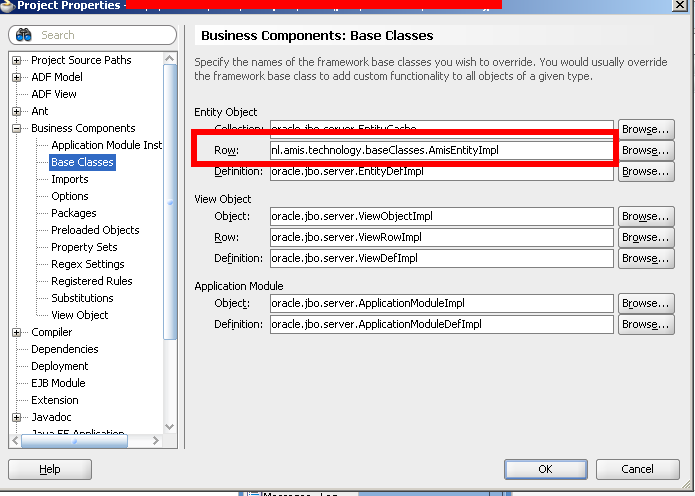
After this I made sure that the project uses this class as a base class for all Entity Objects. This can be configured in the project properties.
Step 2: Configure pre-existing Entity Objects to use the base class
All entities in the project will use this base class. That is, all new Entity Objects, but not all existing Entity Objects. That is one of the reasons why you should create and configure base classes at the start of your project. Even if you base classes do not contain any logic, it is much easier to create them before you create any Entity Objects.
However, there is a way to configure existing Entity Objects. The easiest way is to use the ‘source’ tab of the entity object editor. There I added the RowClass property, and gave it the value of my base class.
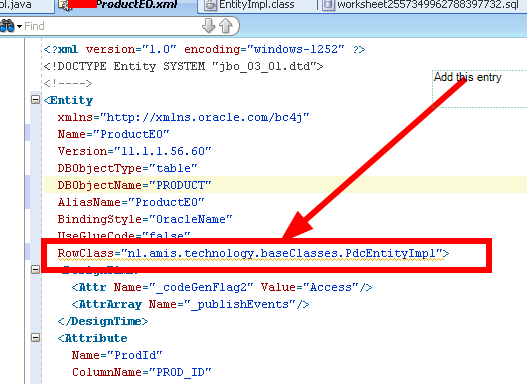
I had to do it for all existing Entity Objects.
Step 3: Write the code for the base class
The code is simple. I want all DML to be intercepted and logged. Therefor I had to create my own doDML() method, that calls super first, and after that calls a method to do the logging (line 9 below). The logging method does all the work like gathering all attributes of the entity object, their old and new values (lines 37 and 38) , and things like the user (line 32) and timestamp (line 30).
package nl.amis.technolgy.baseClasses;

public class AmisEntityImpl extends oracle.jbo.server.EntityImpl {
    public AmisEntityImpl() {
    }

    protected void doDML(int operation, TransactionEvent e) {
        super.doDML(operation, e);
        callLoggingProcedure(operation, e);
    }

    protected void callLoggingProcedure(int operation, TransactionEvent e) {

        String entityName = getEntityDef().getName();
        int count = getEntityDef().getAttributeCount();
        String name = "";
        Object val = null;
        Object oldval = null;
        String dmlAction = null;
        Object theKey = getPrimaryKey().getAttribute(0);

        if (operation == DML_INSERT) {
            dmlAction = "an Insert";
        } else if (operation == DML_UPDATE) {
            dmlAction = "an Update";
        } else if (operation == DML_DELETE) {
            dmlAction = "a Delete";
        }

        Timestamp now = new Timestamp(System.currentTimeMillis());

        String currentUser =
            ADFContext.getCurrent().getSecurityContext().getUserPrincipal().getName();

        for (int i = 0; i < count; i++) {

            val = getAttribute(i);
            oldval = getPostedAttribute(i);
            name = getEntityDef().getAttributeDef(i).getColumnName();

            if (isAttributeChanged(i)) {
               System.out.println("______________       Start Change Log   _________________");
               System.out.println("There was a change in " + entityName);
               System.out.println("Key of this entity =  " + theKey);
               System.out.println("_________________________________________________________");
               System.out.println("Change was " + dmlAction);
               System.out.println("It was changed by " + currentUser);
               System.out.println("Changed on = " + now.toString());
               System.out.println("_________________________________________________________");
               System.out.println(name + " is changed. ");
               System.out.println("OldValue =  " + oldval );
               System.out.println("NewValue = " + val);
               System.out.println("______________       End Change Log     _________________");
            }
        }
// here goes code to write to database via callStoredProcedure.
}
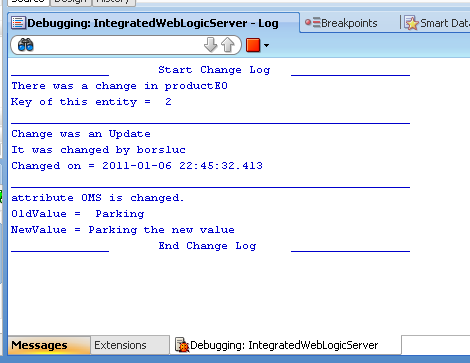
When running the app and commit changed data the console will show what I just did.
Final Remark.
I did not describe how to persist the log in a database table but that is very easy. Use a stored procedure and call it by a callStoredProcedure() method. Depending on requirements you can write the log to a single database column (large varchar2 or clob) or create columns for old value, new value, entity, user and so on.

Hi,
getEntityDef().getSource() should give the dbobject name
Hello,
Thank you providing good article. I have question. How can i get Table Name from entity definition?
I think, Entity object have DBObjectName attribute.
Thank you,
Erdenebayar
Hi,
Â
ODL handles logmessages done by java.util.logging (jul).. Use JUL, or even better use a wrapper like SLF4J. Configuration is done via the console (or in the logging.xml file on the server) and has immediate effect, no restart required :-).
Â
Ciao
Aino
OK, you are right of course. It was just a first investigation into how to tap into the DML operations. Well, you know me. I always want more…
I am looking forward to the next step that you are hinting at.
Lucas
Lucas, What I describe here is a way to gather information about the DML. What you do with that info is totally up to you 😉 I will look into (maybe together with Michel) how we can hook up with Diagnostics Framework. I can use Log4J, or better, I should use Log4J for configuration, and writing log lines. One other thing I’ve been thinking of is to use a properties file for configuring what entities need logging. So, this is a start and there’s a lot more to look into. Maybe a new post within the next month
Hi Luc,
Thanks for your article. I was wondering: can you easily hook the logging information into the logging facilities (Diagnostics Framework) of WebLogic Server? Instead of writing to the console? And I suppose it would be convenient to be able to dynamically switch on or off this fine grained logging. Would you use Log4j or similar for that? Would it make sense to disinguish different sessions in the logging? (otherwise, logging from different threads would mix and clash).
Lucas