
Inspired by a blog article by Edwin Biemond, I decided to try it out myself: previewing an PDF document in an image. However, Edwin used jPedal (http://www.jpedal.org/), a commercial product. It is not extremely expensive – but not freely available., So I decided to look a little further for a truly open source and free product. I found PDF Renderer, published by Sun Microsystems:https://pdf-renderer.dev.java.net/ .It could easily do for me what I was looking for.
As an additional step, I also used iText – http://www.lowagie.com/iText/download.html – an open source project that support programmatic generation of PDF document from Java.
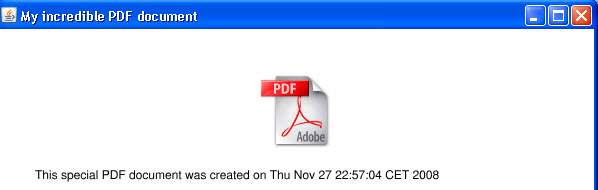
Within half an hour, I had a program running that generated the following preview of the first page of a dynamically produced PDF document:
The steps for achieving this are amazingly simple:
Steps:
1. Download iText
Go to http://www.lowagie.com/iText/download.html and download iText-2.1.4.jar.
2. Download PDF Renderer
Go to https://pdf-renderer.dev.java.net/ and download PDFRenderer.jar
3. Create Project
In your favorite IDE, create an Application/Workspace/Project – whatever you need to get going on an application. Add the two JAR-files you just downloaded as libraries.
4. Create Class
Create a class that creates a PDF document on the fly and then has its first page turned into an image that can be previewed, for example in a Swing Panel:
package pdfimagegenerator;

import com.lowagie.text.Document;

import com.lowagie.text.DocumentException;
import com.lowagie.text.Paragraph;
import com.lowagie.text.pdf.PdfWriter;

import com.sun.pdfview.PDFFile;
import com.sun.pdfview.PDFPage;

import java.awt.Image;
import java.awt.Rectangle;

import java.io.*;

import java.net.MalformedURLException;
import java.net.URL;

import java.nio.ByteBuffer;
import java.nio.channels.FileChannel;

import javax.swing.*;

public class PdfToImage {
    public PdfToImage() {
    }

    private static ByteArrayOutputStream createPDF() throws DocumentException,
                                                            MalformedURLException,
                                                            IOException {
        Document doc = new Document();
        ByteArrayOutputStream baosPDF = new ByteArrayOutputStream();
        PdfWriter docWriter = null;
        docWriter = PdfWriter.getInstance(doc, baosPDF);
        doc.open();
        URL imageUrl = new URL("http://www.bruinenfit.nl/images/pdf-logo.jpg");
        com.lowagie.text.Image image = com.lowagie.text.Image.getInstance(imageUrl);

        image.scaleToFit(300,100);
        image.setAlignment(com.lowagie.text.Image.ALIGN_CENTER);
        doc.add(image);
        doc.add(new Paragraph("This special PDF document was created on " +
                              new java.util.Date()));

        doc.close();
        docWriter.close();
        return baosPDF;
    }

    public static void previewPDFDocumentInImage() throws IOException {
        ByteBuffer buf = null;

        try {
            buf = ByteBuffer.wrap(createPDF().toByteArray());
        } catch (DocumentException e) {
        }
        // use the PDF Renderer library on the buf which contains the in memory PDF document
        PDFFile pdffile = new PDFFile(buf);
        PDFPage page = pdffile.getPage(1);

        //get the width and height for the doc at the default zoom
        Rectangle rect =
            new Rectangle(0, 0, (int)page.getBBox().getWidth(), (int)page.getBBox().getHeight());

        //generate the image
        Image img = page.getImage(rect.width, rect.height, //width & height
                rect, // clip rect
                null, // null for the ImageObserver
                true, // fill background with white
                true) // block until drawing is done
        ;

        //show the image in a frame
        JFrame frame = new JFrame("My incredible PDF document");
        frame.setDefaultCloseOperation(JFrame.EXIT_ON_CLOSE);
        frame.add(new JLabel(new ImageIcon(img)));
        frame.pack();
        frame.setVisible(true);
    }

    public static void main(final String[] args) {
        SwingUtilities.invokeLater(new Runnable() {
                public void run() {
                    try {
                        PdfToImage.previewPDFDocumentInImage();
                    } catch (IOException ex) {
                        ex.printStackTrace();
                    }
                }
            });
    }
}
5. Run the class
The outcome looks like this:
Resources
http://java-polis.blogspot.com/2007/11/creating-pdf-documents-dynamically-in.html

Sorry forgot the link:
http://jmupdf.sourceforge.net
Check out this Java PDF/XPS renderer.
This example works like a charm, for one page. In case of multiple pages, doc.newPage(); after doc.add(image); do the stuff.
Â
This is a good way of generating PDF dynamically. The only problem with this means is that there are no controls similar to Adobe Reader’s controls. How could that be added to the application.
Thanks for this great post!
🙂
Hi,
very nice Lucas I will give it a try. There is a jpedal gpl version, only your code has to be open source and not commercial too
Thanks Edwin